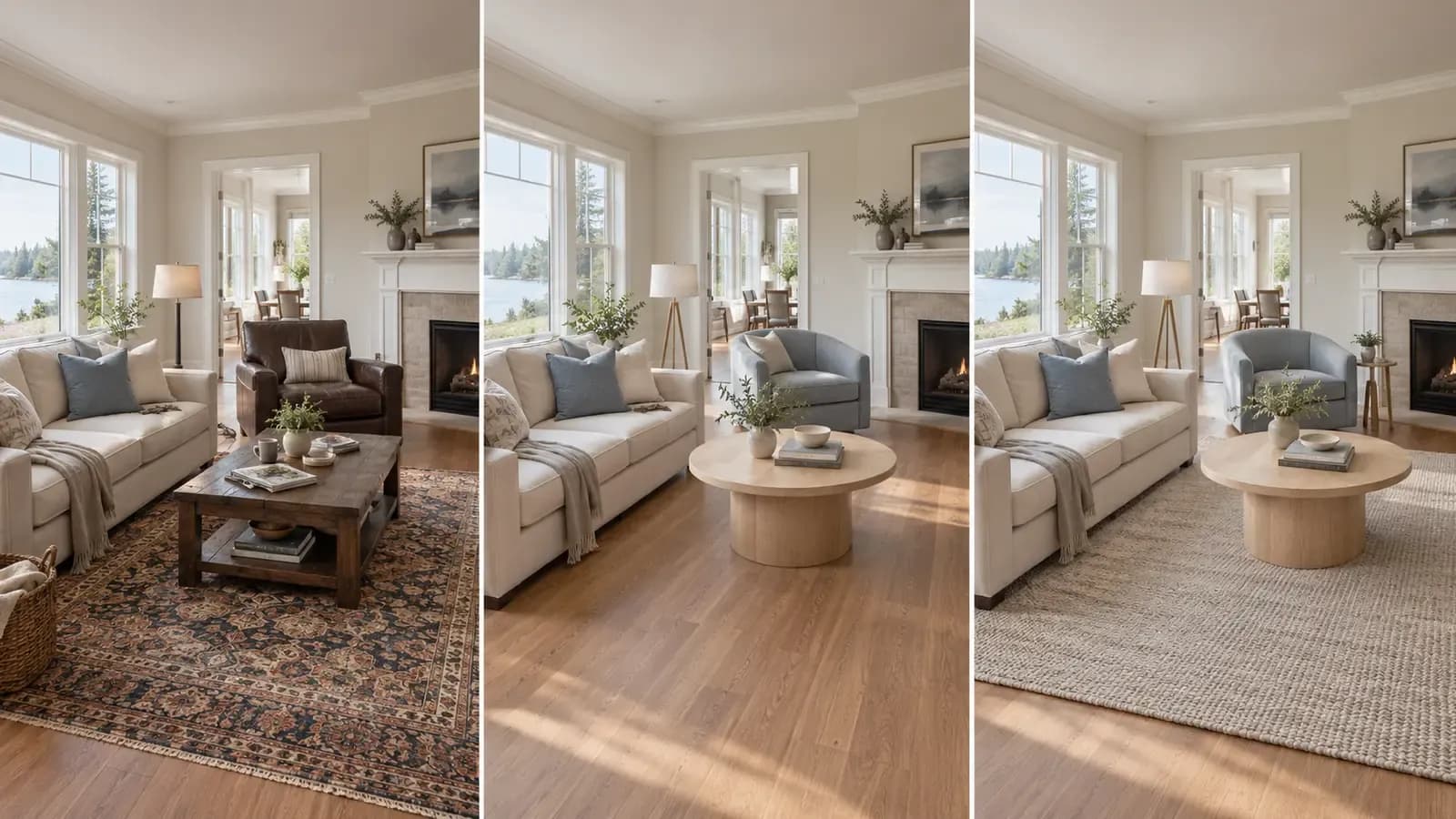

A furnished room is often harder to stage than an empty one.
The AI is not beginning with a blank floor and clear walls. It has to interpret a sofa, chairs, rugs, lamps, artwork, personal belongings, and the architecture behind them. Some of those elements may be worth keeping. Others may be the reason the room photographs poorly.
The most useful question is therefore not, “How do I remove everything?” It is:
What should stay, what should change, and what must remain true to the property?
Virtual staging a furnished room works best when it is treated as a selective editing process. Keep the elements that establish believable scale or already suit the space. Replace the pieces that make the room feel dated, crowded, or visually inconsistent. Remove temporary clutter, but do not erase permanent features or hide material problems.

Do You Need to Empty the Room First?
Not always.
An empty input can be simpler for an AI system to interpret, but digitally clearing the entire room is not automatically the best strategy. Existing furniture can provide useful visual information about scale, circulation, and how the room is currently used.
A well-proportioned dining table may help establish the size of a dining area. A built-in bench may be part of the architecture rather than temporary furniture. A neutral sofa in good condition may only need different chairs, lighting, or accessories around it.
Removing everything also creates more opportunities for error. The system may have to reconstruct flooring, wall edges, outlets, baseboards, or shadows that were previously hidden. If those reconstructed areas are inaccurate, the finished image can look clean while becoming less faithful to the property.
Start by deciding which of three actions applies to each visible element:
Decision | Use it when | Typical examples |
|---|---|---|
Keep | The item fits the room, supports believable scale, and works with the intended design direction. | Neutral sofa, dining table, built-in shelving, simple bed frame |
Replace | The function is right but the style, condition, color, or proportion weakens the image. | Oversized armchair, dated coffee table, mismatched lamp, visually heavy rug |
Remove | The object is temporary, distracting, personal, or blocks the room's architecture. | Moving boxes, excess accessories, pet items, personal photographs, loose cables |
This Keep–Replace–Remove decision is more reliable than asking the AI to “make the room modern” without explaining what the final image should preserve.

What Existing Furniture Is Worth Keeping?
Keep an item when it already does useful work in the room.
The strongest candidates usually have one or more of these qualities:
- Their proportions are believable for the available space.
- They do not block doors, windows, walkways, or built-ins.
- Their color and material can fit the new design direction.
- They help a viewer understand the room's function.
- Their edges and shadows are clear enough to preserve cleanly.
Large anchor pieces deserve particular attention. If a sofa, bed, or dining table already fits, retaining it can make the edit feel more grounded. The new design can then be built through smaller changes: a different rug, more appropriate chairs, updated lighting, restrained artwork, or a clearer palette.
Keeping some furniture can also make the concept more practical for homeowners. Instead of presenting a total redesign that requires replacing every object, the image can show how a few focused changes alter the room.
That said, “keep” does not mean “ignore.” Check whether the retained item still matches the new lighting, palette, and surrounding furniture. A real sofa pasted into a newly generated environment can look just as artificial as a poorly generated sofa if its shadows and color temperature no longer belong to the scene.
When Should Existing Furniture Be Replaced?
Replace furniture when the room's function is correct but the visible pieces prevent viewers from seeing its potential.
Common reasons include:
- The furniture is too large or too small for the room.
- Several pieces belong to unrelated styles.
- Dark or heavy furniture makes a small room appear more crowded.
- An old layout creates poor circulation.
- The furniture dominates the photograph instead of supporting the architecture.
- A seller or homeowner wants to compare a different design direction before buying anything.
Replacement should be specific. “Change the chair” is better than regenerating the entire room. “Use a lower-profile sofa in a warm neutral fabric” is better than requesting a completely new living room when the rest of the image is already working.
Selective replacement reduces visual drift. Every additional regenerated area gives the system another chance to alter a wall line, window, floor pattern, reflection, or neighboring object.
It also creates a more useful comparison. When only the sofa changes, the viewer can judge the sofa. When the sofa, wall color, windows, flooring, artwork, and camera angle all change at once, it becomes difficult to know what improved the room.
Remove Clutter, Not Property Features
Removing temporary visual noise can make a room easier to understand. Removing part of the property can make the image misleading.
Reasonable cleanup targets may include loose cables, packaging, small personal items, excessive countertop objects, or temporary storage. Permanent and material elements require a much stricter boundary.
Do not casually remove or change:
- Doors and windows
- Fireplaces and built-in cabinetry
- Structural columns or ceiling transitions
- Radiators, vents, and fixed HVAC elements
- Floor level changes or staircases
- Visible damage or conditions that could affect a buyer's understanding
- Exterior views that belong to the actual room
The objective is to reduce distraction without rewriting the property.
For real estate marketing, retain the original image and clearly disclose material digital changes. Requirements differ by MLS, brokerage, platform, and location, so the relevant rules should be checked before publication. The Astage guide to virtual staging disclosure explains a practical original-image and labeling workflow.
Photograph the Furnished Room for a Better Edit
The source image determines how much reliable information the AI receives.
Before taking the photograph:
- Remove small clutter that can be moved physically in a few minutes.
- Open curtains or blinds without overexposing the windows.
- Turn on lights only if they improve the scene consistently.
- Straighten furniture that you intend to keep.
- Make doors, wall edges, and floor boundaries visible where possible.
- Avoid including people, pets, or objects moving through the frame.
Photograph from a natural standing height. Keep vertical walls reasonably straight and avoid an ultra-wide setting that stretches furniture at the edges. A corner view often provides enough depth to understand the layout, but it should not hide the relationship between large furniture and important openings.
If an item must be replaced, make sure its full outline is visible. A chair partly hidden behind a table or a sofa cropped by the frame is more difficult to edit cleanly.
The photograph does not need to look empty. It needs to make the room legible.

Build the New Room Around One Clear Direction
Furnished-room staging can become visually confused when the retained furniture points in one direction and the generated furniture points in another.
Choose a design direction that can work with the pieces you intend to keep. A pale-oak dining table may adapt easily to Scandinavian, contemporary, or warm minimal interiors. A traditional carved cabinet may require a more transitional approach rather than an abrupt shift to stark minimalism.
Define a few rules before generating:
- Base color temperature
- Main wood tone
- Furniture shape language
- Metal finish
- Amount of contrast
- Styling density
These rules do not need to make every object match. They simply prevent the image from becoming a collection of individually attractive but unrelated pieces.
If the same direction needs to continue into other rooms, use a common reference and shared design rules. The guide to keeping interior design consistent across multiple rooms with AI explains how to carry palette, materials, shapes, and mood without copying the same furniture everywhere.
Review the Result in Two Passes
Do not approve the image after looking only at the overall style.
First pass: Does the design work?
Review the room as an interior concept:
- Does the layout support the room's function?
- Is there believable circulation around the furniture?
- Do retained and replaced pieces feel related?
- Is the visual weight appropriate for the room size?
- Does the design improve the image without overfilling it?
Second pass: Is the property still accurate?
Compare the generated version directly with the original:
- Are doors, windows, walls, and built-ins unchanged?
- Does the floor continue naturally behind replaced objects?
- Are outlets, vents, and baseboards still plausible?
- Do retained items keep their original shape?
- Are contact shadows consistent with the room's light?
- Has the edit invented more space than the photograph supports?
This second pass is where polished-looking errors are often found. A beautiful image is not ready for publication if a door has narrowed, a window has moved, or a new sofa makes the room appear larger than it is.
For a closer review framework, read why AI virtual staging can look unrealistic.
How Astage AI Fits a Furnished-Room Workflow
Astage AI accepts room photos that may be empty or furnished, allowing users to explore a new design without requiring a physically empty starting point. Its One-Click Furniture Swap capability is particularly relevant when most of the room works and one item does not.
Instead of regenerating the entire composition, users can identify a piece in the rendered room and explore alternatives. This supports the selective approach described above: preserve the room, keep the useful parts, and focus the change where it matters.
The furniture shown in Astage designs can also connect to real products. When a replacement direction is approved, users can move from a visual idea toward reviewing actual furniture rather than stopping at a purely imaginary object. The article on AI virtual staging with real furniture explains how that shoppable workflow works.

AI staging remains a visual planning and marketing tool. It does not verify exact room dimensions, product fit, inventory, delivery, or property condition. Confirm measurements and product details before making a purchase.
Frequently Asked Questions
Can you virtually stage a room that already has furniture?
Yes. A furnished room can be virtually restyled by keeping suitable items, replacing selected furniture, or removing temporary distractions. The result should be compared with the original to confirm that the architecture and room proportions remain accurate.
Should all existing furniture be removed before virtual staging?
No. Furniture that fits the room and supports the intended design may be worth keeping. Removing everything can require the AI to reconstruct hidden floors, walls, and details, which may introduce new errors.
Can AI replace one piece of furniture in a photo?
Some AI interior-design platforms support individual furniture replacement. This is useful when the room works overall but a sofa, chair, table, lamp, or rug needs to change.
Can virtual staging remove clutter?
AI can remove some temporary objects and visual clutter, but the edited areas must be checked carefully. Permanent features, material defects, and property conditions should not be concealed.
Do furnished-room virtual staging images need disclosure?
For real estate marketing, material digital changes should be disclosed according to the applicable MLS, brokerage, platform, and local requirements. Keep the original photograph and avoid edits that misrepresent the property.
A Better Edit Begins With a Smaller Decision
The strongest furnished-room transformation is rarely the one that changes the most.
It is the one that knows why each change is being made.
Keep the sofa because its scale works. Replace the chairs because they crowd the walkway. Remove the boxes because they are temporary. Preserve the fireplace, windows, flooring, and room boundaries because they are part of the property.
That discipline produces more than a cleaner image. It creates a staged room that remains understandable, believable, and useful.
Try Astage AI with a furnished room photo and explore which pieces are worth keeping—and which one change could make the room work better.