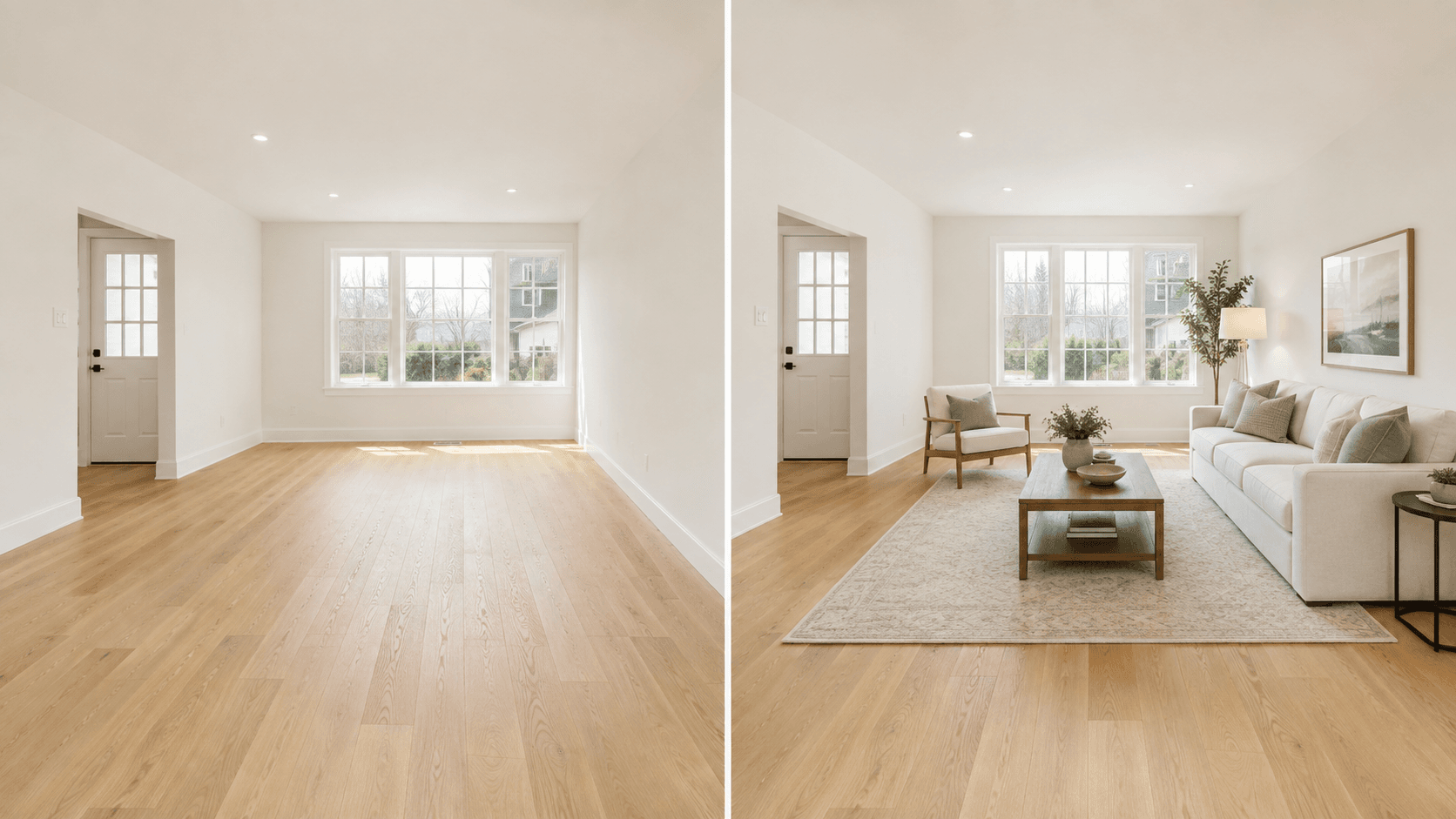

A clear virtual staging disclosure should tell buyers that a listing image has been digitally furnished or altered, identify the affected photo, and make the original image available when local rules require it.
There is no single disclosure format that applies to every real estate market. One MLS may require a phrase in the photo description, another may require the original image next to the staged version, and a state law may impose additional requirements on advertising outside the MLS.
The safest approach is straightforward: preserve the original photo, label the staged version clearly, avoid changing permanent property features, and verify the current rules for every platform where the image will appear.
This article provides general information, not legal advice. Real estate professionals should confirm applicable laws, MLS rules, brokerage policies, and advertising requirements before publishing digitally altered images.
What Is Virtual Staging Disclosure?
Virtual staging disclosure is a notice explaining that furniture, décor, or other visual elements in a property photo were added, removed, or changed digitally.
The disclosure helps buyers understand the difference between:
- The property’s actual photographed condition
- A possible furniture arrangement
- An AI-generated or digitally edited visualization
- Features that are physically present at the property
A useful disclosure is specific enough to prevent confusion. A vague statement buried at the bottom of a listing may not give buyers enough context, particularly when staged and original photos look similar.
For example:
Virtually staged. Furniture and décor shown in this image were added digitally. See the original photo for the property’s current condition.
That wording is clearer than:
Image enhanced.
“Enhanced” could refer to ordinary brightness or color correction. It does not necessarily tell the buyer that the room contains digitally added furniture.
Do All MLS Platforms Use the Same Virtual Staging Rules?
No. MLS virtual staging rules vary by market, and they can change over time.
The National Association of REALTORS® provides a broad ethical standard rather than one universal photo-labeling procedure. Article 12 of the 2026 NAR Code of Ethics requires REALTORS® to be honest in real estate communications and present a true picture in advertising and marketing. Its standards also prohibit the use of misleading images.
Individual MLS organizations may then specify:
- Where the disclosure must appear
- What wording must be used
- Whether a dedicated field must be selected
- Whether the original photo must be included
- Where the original and altered images must appear
- Which types of digital changes are permitted
- Whether text or watermarks may appear directly on the image
This is why an agent should not copy a disclosure workflow from another market without checking local requirements.
How Disclosure Requirements Can Differ
The following examples demonstrate how rules may vary. They are not a complete list of requirements for every market.
Stellar MLS
Stellar MLS requires virtually staged photos to be identified in the photo description with the words “Virtually staged.” Its rules also require the virtually staged field to be selected and specify wording for the beginning of the public remarks.
Stellar permits the addition or replacement of personal property such as furniture, artwork, mirrors, and plants. It prohibits changes to permanent fixtures, room dimensions, property defects, views, and other physical characteristics.
Agents using Stellar MLS should review the complete Stellar MLS virtual staging rules, because its required fields and wording should not be replaced by a generic disclosure copied from another platform.
CRMLS and California Listings
California Assembly Bill 723 took effect on January 1, 2026. The law applies to certain digitally altered images used by real estate brokers, salespeople, or people acting on their behalf in advertising or promotional materials.
The law requires a reasonably conspicuous disclosure on or adjacent to an altered image and public access to the original, unaltered image through the applicable advertisement, website, URL, or QR code. The exact obligation depends partly on where the material is published and whether the real estate professional controls the website. The full requirements are available in the official California AB 723 text.
CRMLS guidance states that a digitally altered image should be labeled in the photo description and that the original image should appear immediately before or after the altered version in the listing. It also treats digitally removing existing furniture as an alteration that requires disclosure. Agents using CRMLS should follow its current digitally altered image guidance.
NorthstarMLS
NorthstarMLS’s 2026 guidance recommends identifying virtually staged or AI-enhanced images in the caption or on the photo and including an unaltered Before image for the same room or area.
Its guidance draws a practical line between personal property and permanent property features. Furniture and décor may be visualized, while walls, flooring, windows, doors, fireplaces, roofing, driveways, and other permanent elements should not be fabricated, hidden, or materially changed. See the current NorthstarMLS guidelines for details.
These examples share a common purpose—preventing misleading advertising—but the required implementation is not identical.
What Counts as a Digitally Altered Listing Image?
A photo is generally considered digitally altered when software or AI changes what the viewer sees in the room or property.
Examples may include:
- Adding virtual furniture
- Removing existing furniture
- Replacing furniture with a different style
- Adding rugs, artwork, lamps, plants, or décor
- Removing clutter or personal belongings
- Changing paint colors or flooring
- Adding appliances or fixtures
- Replacing a view through a window
- Repairing visible damage digitally
- Changing landscaping or exterior features
Not every photographic adjustment carries the same meaning.
Routine corrections such as cropping, straightening, exposure adjustment, white balance, sharpening, and color correction may be treated differently when they do not materially change the property’s condition. California’s AB 723, for example, excludes certain common photographic adjustments from its definition of a digitally altered image when those adjustments do not change the representation of the real property.
The distinction is not simply whether AI was used. The more important question is whether the edit changes a buyer’s understanding of the property.
What Can Usually Be Added in a Virtually Staged Photo?
Rules differ, but virtual staging is generally intended to help buyers visualize non-permanent items.
Common examples include:
- Sofas
- Chairs
- Beds
- Tables
- Rugs
- Lamps
- Artwork
- Plants
- Mirrors
- Removable decorative objects
These items help communicate the possible use and scale of an empty room without suggesting that the furniture is included in the sale.
Even when furniture additions are permitted, they should remain realistic. An undersized sofa should not be used to make a small living room appear unusually large. A bed should not block a real doorway or conceal a permanent fixture.
The staged image should remain a plausible visualization of the photographed space.
What Should Not Be Changed?

Virtual staging should not be used to hide defects, fabricate improvements, or change the physical identity of the property.
High-risk edits include:
- Removing cracks, stains, holes, exposed wiring, or damaged flooring
- Adding a fireplace, built-in cabinet, window, door, or lighting fixture
- Changing the shape or size of a room
- Replacing an ordinary view with an ocean, skyline, or landmark
- Removing utility poles, neighboring structures, or other external conditions
- Changing permanent flooring, countertops, walls, or cabinetry
- Adding landscaping or exterior improvements that do not exist
- Using incorrectly scaled furniture to distort room dimensions
A disclosure does not automatically make every alteration acceptable. Labeling a fabricated feature as digitally altered does not necessarily cure a misleading representation or make it permissible under local rules.
Should the Original Photo Be Included?
Including the original photo is one of the clearest ways to show the property’s actual condition.
In some markets, it is a legal or MLS requirement. In others, it may be a recommended best practice rather than a formal rule.
A practical sequence is:
- Original room photo
- Virtually staged version of the same room
- Clear description identifying which image is original and which is staged
The two images should use the same camera angle whenever possible. If the angle, crop, or perspective changes significantly, buyers may find it more difficult to compare them.

Astage AI users should retain the uploaded original and compare it with every generated result before publication. The staged version should support buyer visualization without replacing the factual record of the property.
Where Should the Disclosure Appear?
The correct location depends on local rules and the publishing platform.
Possible disclosure locations include:
- The photo description or caption
- A dedicated “virtually staged” field
- The public remarks
- Text displayed on the altered image
- A notice immediately next to the image
- A link or QR code leading to the original photo
- An adjacent original image
Do not assume that adding a watermark directly to the image is always the correct solution. Some MLS platforms restrict text, branding, or graphics inside property photos and instead require disclosure in designated data fields.
Check each of the following before publishing:
- Local MLS rules
- State or national law
- Brokerage policy
- Photographer or editing agreement
- Property portal requirements
- Social media and advertising format
- Seller instructions
A disclosure that works in the MLS may need to be adapted for a property website, printed flyer, social media post, or email campaign.
Virtual Staging Disclosure Examples
The wording should describe what actually happened to the image. It should not claim compliance unless that compliance has been verified.
When Furniture Was Added to an Empty Room
Virtually staged. Furniture and décor shown in this image were added digitally. See the original photo for the room’s current condition.
When Existing Furniture Was Removed and Replaced
Digitally altered and virtually staged. Existing furniture was removed from the image and replaced with digital furnishings. The original photo is provided for reference.
When the Original Appears Next to the Staged Image
Virtually staged image. The adjacent original photo shows the property’s actual photographed condition.
When Several Listing Photos Were Staged
One or more listing photos have been virtually staged. Each altered image is identified in its photo description, and original images are included where required.
These are general examples, not universal legal templates. If an MLS requires exact wording, use that wording instead.
A Pre-Publication Checklist for Real Estate Agents
Before uploading virtually staged photos, complete the following review.
1. Confirm the Applicable Rules
Check the property’s location, MLS, brokerage, advertising channels, and any relevant state or national requirements.
2. Preserve the Original Files
Keep the unedited source photographs with clear filenames and creation dates. Do not overwrite the originals with staged exports.
3. Compare Every Staged Image With the Original
Review:
- Walls
- Windows
- Doors
- Flooring
- Outlets
- Vents
- Permanent lighting
- Built-in features
- Views
- Visible defects
- Room proportions
4. Check Furniture Scale and Placement
Confirm that furniture does not distort the room’s size, block access points, conceal permanent features, or appear physically impossible.
5. Add the Required Disclosure
Use the wording and fields specified by the applicable MLS or platform. Do not rely on a generic caption when an exact phrase or checkbox is required.
6. Include the Original Photo Where Required
Place it in the required order and make it easy for the viewer to identify.
7. Review Every Marketing Channel
Check the MLS listing, brokerage website, property website, social posts, printed materials, email campaigns, and syndication feeds.
8. Keep a Publication Record
Retain the original image, altered image, disclosure wording, publication date, and the rule or policy reviewed by the team.
How Astage AI Fits Into a Disclosure-Safe Workflow
Astage AI can help real estate professionals visualize furniture arrangements and interior styles from property photos. The output should be treated as a marketing visualization rather than independent proof of the property’s condition.
A practical workflow is:
- Upload an original property photo.
- Generate a staged concept.
- Compare the result with the source image.
- Reject any version that changes or conceals permanent features.
- Download the approved staged image.
- Apply the disclosure process required by the relevant market and platform.
- Publish the original photo alongside the staged image when required.
Astage AI does not replace the agent’s responsibility to review the result or verify local rules. No virtual staging platform can guarantee universal MLS compliance because the requirements depend on location, listing service, brokerage, advertising channel, and the specific edits made to the photo.
This review-based approach is more reliable than treating an AI-generated image as automatically ready for publication.
Frequently Asked Questions
Do Virtually Staged Photos Have to Be Disclosed?
Disclosure requirements depend on the applicable law, MLS, platform, and brokerage policy. Many markets require virtually staged or digitally altered photos to be clearly identified.
Even when an exact disclosure format is not specified, transparent labeling helps buyers understand that the furnishings are not physically present.
What Should a Virtual Staging Disclaimer Say?
A useful virtual staging disclaimer identifies the image as virtually staged, explains what was added or removed, and directs the viewer to the original photo when appropriate.
Use exact wording required by the applicable MLS when such wording exists.
Should the Words “Virtually Staged” Appear on the Image?
Not necessarily. Some markets may accept or require an on-image label, while others require the disclosure in the photo description, a dedicated field, or the public remarks. Some MLS platforms restrict text and graphics on listing photos.
Confirm the required location before adding a permanent watermark.
Do I Need to Show the Original Photo?
Some laws and MLS rules require access to the original image. Others recommend it as a best practice.
Including an original Before photo next to the virtually staged After image is generally the clearest way to show the room’s actual condition.
Is Removing Furniture Considered Digital Alteration?
It may be. CRMLS guidance, for example, treats digitally clearing a furnished room as an alteration that should be disclosed and accompanied by the original image.
Do not assume that removal requires less disclosure than addition.
Can Virtual Staging Change Paint, Flooring, or Permanent Fixtures?
These changes may be prohibited or subject to stricter disclosure requirements because they affect the representation of the real property rather than removable furnishings.
Check the applicable rules before publishing any image that changes permanent finishes or fixtures.
Are AI-Generated Listing Photos Automatically MLS-Compliant?
No. The use of an AI virtual staging tool does not make an image automatically compliant.
The agent or publisher must review the output, preserve architectural accuracy, follow the required disclosure procedure, and confirm the rules that apply to the specific listing.
Final Recommendation
Virtual staging disclosure should be built into the listing workflow, not added as an afterthought.
Before publishing a staged image:
- Preserve the original photo.
- Compare the original and staged versions.
- Reject misleading structural or permanent changes.
- Identify the staged image clearly.
- Include the original where required.
- Verify the latest local MLS, legal, platform, and brokerage rules.
- Keep a record of the approved images and disclosure used.
Astage AI can support the visualization process, but the final publishing decision still requires professional review.
Start with one real listing photo. Generate a staged version, compare every permanent feature with the original, and confirm the correct disclosure procedure before adding it to a live property listing.