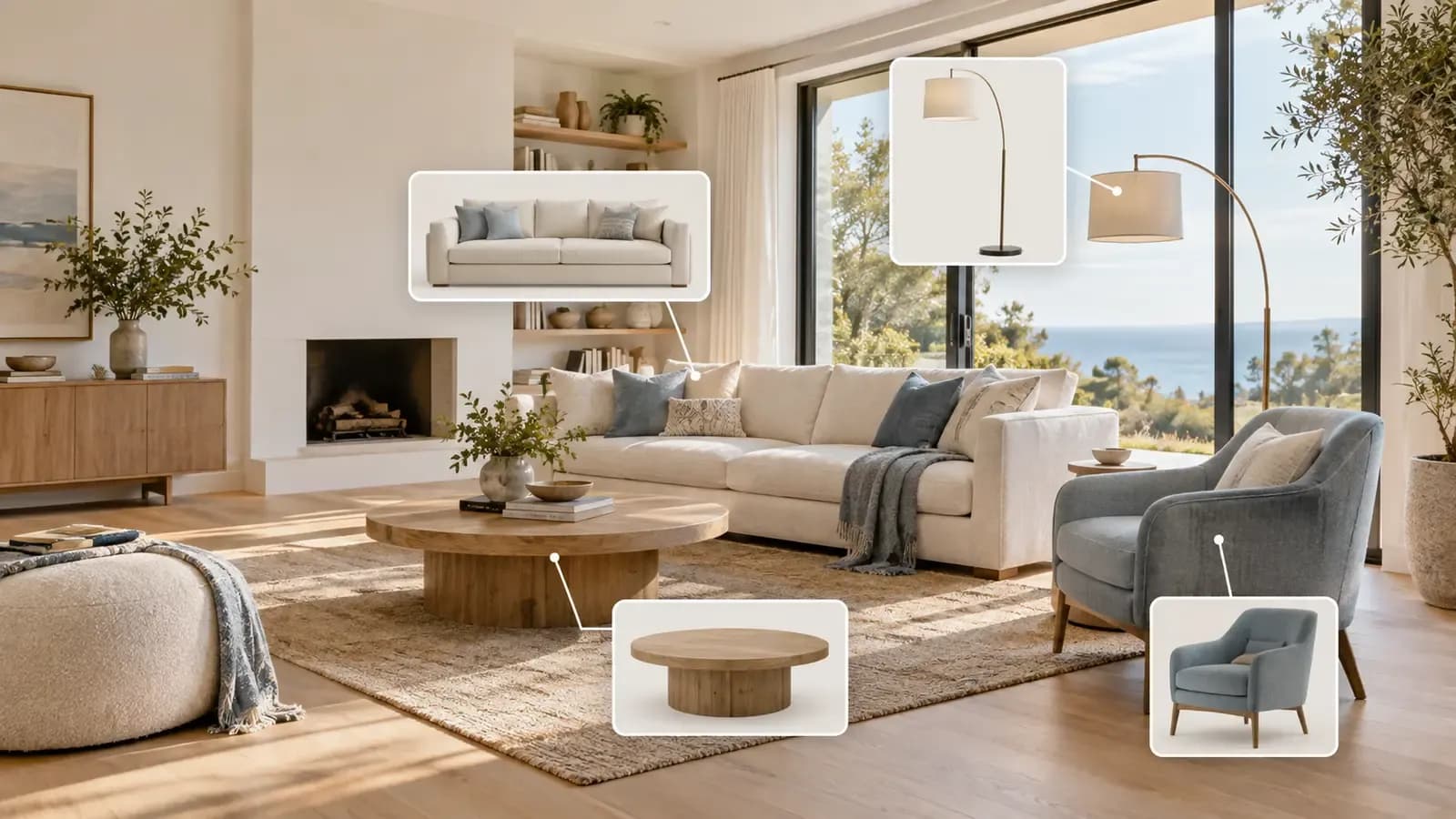


Sometimes. It depends on how the virtual staging platform creates the room.
In many AI-generated interiors, the sofa, table, lamp, or chair is simply part of the image. It may look convincing, but there is no product name, verified size, retailer, or place to buy it. The furniture is visual inspiration rather than a real shopping option.
AI virtual staging with real furniture works differently. The staged room is connected to products that exist outside the image. A user can explore the design, identify a piece they like, and follow the available product link to review it with the retailer.
That connection closes an important gap. The image no longer answers only, “What could this room look like?” It can also help answer, “What could I actually use to create this look?”
A Realistic Sofa Is Not Always a Real Product
AI is very good at producing objects that look familiar. It can generate a believable linen sofa, a walnut coffee table, or a curved floor lamp without referring to a specific item sold by a real company.
This distinction is easy to miss because both results can look photorealistic.
Furniture in the image | What it means |
|---|---|
Visually generated furniture | The object looks like furniture, but the exact item may not exist as a product. |
Real, linked furniture | The staged piece is connected to a product that can be reviewed on a retailer's page. |
Similar product suggestion | The recommended item resembles the image but may not be the exact piece shown. |
Before treating a design as shoppable, check what the platform actually provides. Is there a direct product link? Does the listing show a recognizable product, brand, dimensions, materials, and current seller? Or is the system offering a visual match after the image has already been generated?
Those are different experiences, and the difference matters when the design starts influencing a purchase.

What “Shoppable Virtual Staging” Should Let You Do
Shoppable virtual staging connects a room visualization with furniture discovery. At a practical level, it should let a user do more than admire the finished image.
A useful experience allows you to:
- See furniture inside the context of your own room
- Identify the pieces used in the design
- Replace an item that does not suit the space or your taste
- Compare a different sofa, chair, table, or light in the same room
- Open the corresponding product page to check real purchasing information
The last step is especially important. A product link turns an attractive object into something you can investigate. You can check its listed dimensions, material, color options, price, stock status, delivery terms, and return policy.
The staging image does not replace those checks. It gives them context.
Why Furniture Replacement Matters More Than Endless Regeneration
A room can be almost right and still fail because of one object.
Perhaps the sofa is too dark. The coffee table interrupts the walkway. An accent chair feels too bulky beside the window. Regenerating the entire room may fix that item, but it can also change the parts that already worked: the rug, lighting, wall art, or overall composition.
Individual furniture replacement gives the user a more controlled decision. Instead of asking the system to invent a completely new room, you can keep the direction and test the part that is causing doubt.
This is closer to how people make real furnishing decisions. They rarely discard an entire plan because one chair is wrong. They compare another chair.

The comparison also makes preferences easier to explain. “I want something lighter” is vague. Seeing two real alternatives in the same setting gives a homeowner, partner, client, or designer something concrete to discuss.
The Hard Part Is Still Scale
Finding a real product does not automatically mean it belongs in the room.
A sectional can be available to buy and still overwhelm a narrow living area. A coffee table may suit the style but leave too little clearance. A compact chair might fit physically yet look lost next to a long sofa.
Good virtual staging should present furniture with believable relationships to the visible room. Doors, windows, floorboards, ceiling height, and wall intersections provide clues about space. The generated arrangement should respond to those clues so that the furniture does not feel oversized, undersized, or detached from the architecture.
That is proportional accuracy, not a substitute for measurement.
A single room photograph does not confirm exact wall lengths or clearances. Even when the staged proportions look natural, measure the physical room and compare those measurements with the dimensions on the retailer's product page before ordering.
For a closer look at the visual warning signs, read Why Does AI Virtual Staging Look Unrealistic?.
A Better Way to Move From Image to Purchase
The most useful workflow is neither “generate and immediately buy” nor “treat the image as decoration.” It is a short evaluation process.
Start with the room, not the catalog
Use a clear photograph that shows the floor, walls, windows, doors, and other fixed features. The room should remain the reference point throughout the design.
Choose the overall direction
Explore a style that makes sense for the property and how the room will be used. At this stage, focus on layout, mood, and the relationship between the main furniture pieces.
Correct the weak item
If the design works except for one piece, replace that object rather than changing everything. Compare alternatives in the same visual context.
Open the real product information
Once a piece looks promising, leave the render and inspect its retailer page. Check the dimensions, materials, configuration, color, current price, availability, delivery, and returns.
Measure before committing
Mark out the furniture footprint in the room if necessary. Confirm doors can open, walkways remain usable, and the item can be delivered through the building and entryway.
The AI image helps narrow the options. The final decision still depends on real product data and real measurements.

How Astage AI Connects the Design to Real Furniture
Astage AI starts with a photo of the user's room and builds a furnished design around the visible space. Users can explore different styles and replace individual furniture pieces when part of the result does not work.
The furniture is connected to real products from retailers including Amazon, Wayfair, IKEA, and more than 100 other retailers. Available links let users move from the staged scene to the relevant product source instead of trying to search for a vaguely similar object afterward.

This does not turn the render into a measured floor plan or guarantee that an item will fit. Its value is more practical: the room idea, furniture comparison, and product discovery happen in one connected process.
For users who are new to staging, the step-by-step AI virtual staging guide explains how a room photo becomes a furnished concept. The guide to redesigning a room from a photo covers the broader planning process.
Different Users Need Different Things From the Same Image
For a homeowner, shoppable staging can reduce the distance between inspiration and action. The room provides context, while product links make it possible to investigate the pieces behind the look.
For an interior designer, it can speed up early exploration and client conversations. A linked product is easier to discuss than an untraceable AI-generated object, although professional specification and sourcing work still remain.
For a real estate professional, the primary purpose is different. Virtual staging helps viewers understand how an empty room might be used. Shoppable furniture can add useful context, but the image should still be clearly disclosed as virtually staged and should not materially alter the property. See the Virtual Staging Disclosure Guide before publishing listing images.
Questions to Ask Before Buying Anything From a Staged Room
Use the image to form a shortlist, then verify the details that the image cannot prove:
- Is this the exact product shown, or only a visually similar suggestion?
- What are the full width, depth, height, and required clearances?
- Does the selected color or configuration match the staged version?
- Is the product currently available in your location?
- Have the price, shipping cost, delivery window, and return terms changed?
- Can the item pass through the entrance, hallway, elevator, or stairs?
- Does the layout still work when doors, drawers, and chairs are in use?
A polished image can make a purchase feel settled before the practical questions have been answered. The best use of shoppable virtual staging is to make those questions easier to answer, not to skip them.
Frequently Asked Questions
Can you buy furniture shown in AI virtual staging?
You can when the platform connects the staged furniture to real product listings. Some AI interior images contain purely generated objects, so look for an identifiable item and a direct product source rather than assuming every piece exists.
What is shoppable virtual staging?
Shoppable virtual staging is a room visualization connected to real furniture products. It allows users to explore a furnished concept and continue to product information that may support an actual purchase.
Is the linked furniture guaranteed to fit the room?
No. A staged image can show believable proportions without providing verified room measurements. Measure the room and compare those measurements with the retailer's product dimensions before buying.
Can I replace one piece of furniture without changing the whole design?
This depends on the platform. Astage AI allows users to replace individual furniture pieces, making it possible to compare an alternative while keeping the broader room direction.
Are price and availability shown in virtual staging always current?
Do not assume they are. Prices, stock, delivery options, and product configurations can change. Confirm the current details on the retailer's page before making a decision.
A Room Image Becomes More Useful When It Leads Somewhere
AI virtual staging is often described as a way to make an empty room look furnished. That is only the visual layer.
When the furniture corresponds to real products, the image can support a more useful sequence: understand the room, compare an option, inspect the product, verify the measurements, and decide with better information.
The result is still a concept, not a purchase guarantee. But it is a concept with a practical next step.
Explore Astage AI to create a room concept, compare furniture choices, and discover real products behind the design.