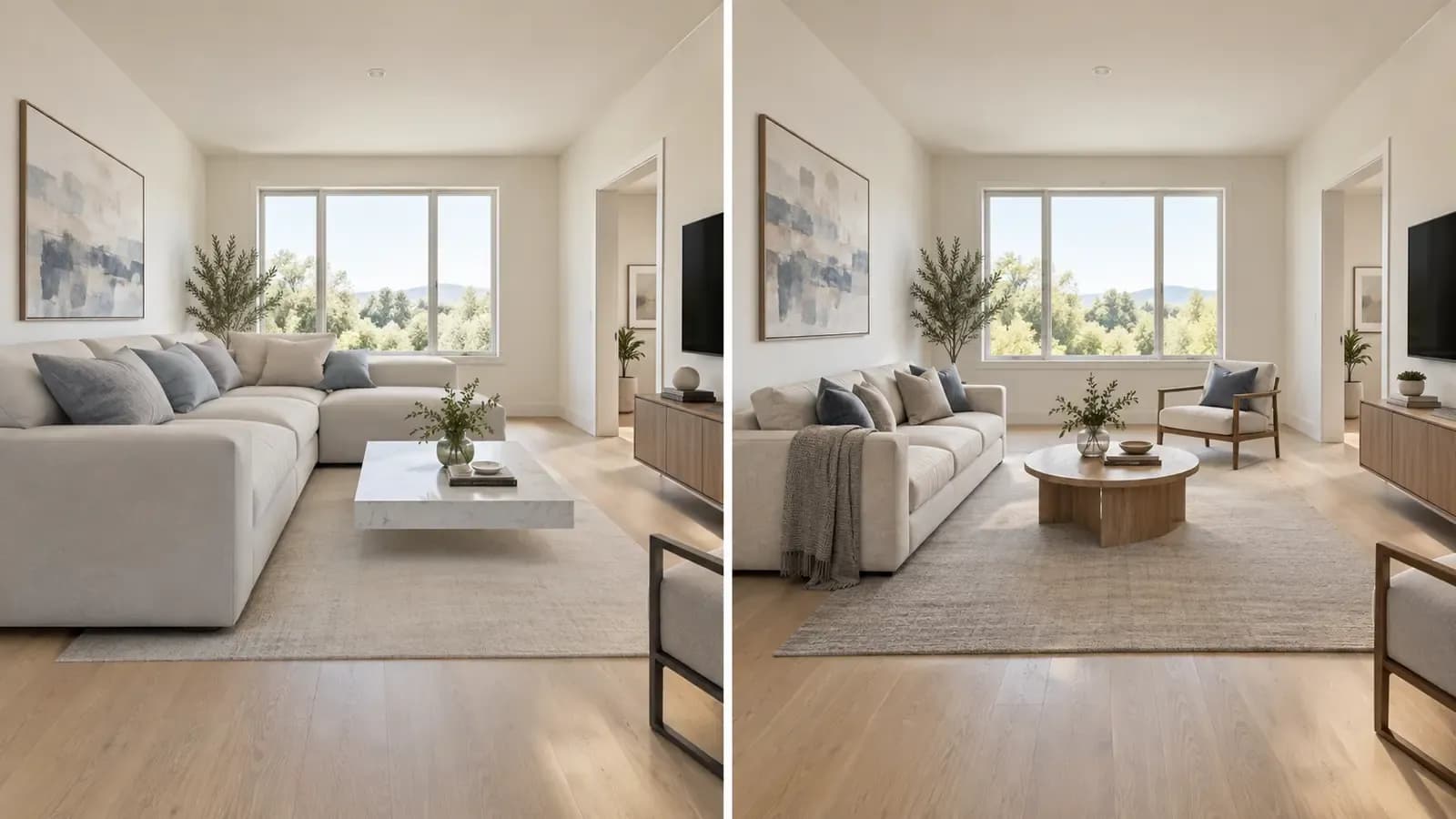


AI virtual staging usually looks unrealistic when the generated furniture does not follow the room’s visible scale, perspective, lighting, or physical structure. A sofa may be too large for the wall behind it. A table may sit at an angle that does not match the floor. Shadows may fall in the wrong direction, or a window may quietly change shape during generation.
The image can still look polished at first glance. The problem appears when something about the room simply feels wrong. Believable staging depends on whether every new object appears to belong inside the original photograph.
What Makes AI Virtual Staging Look Real?
A realistic result keeps four things working together:
- Scale: The furniture looks appropriately sized for the room.
- Perspective: New objects follow the same camera angle and vanishing points as the photograph.
- Light: Highlights and shadows agree with the visible windows and light sources.
- Structure: Walls, windows, doors, floors, ceilings, and built-in features remain faithful to the property.
Recent research on AI-generated interior imagery evaluates spatial quality through factors such as layout, harmony, lighting, and distortion. Research into generated architectural images also identifies inconsistent vanishing points as a specific cause of weak structural realism. Viewers may not name the technical problem, but they notice when the geometry does not add up.
Here are the most common reasons it happens.
1. The Furniture Scale Does Not Match the Room
Incorrect furniture scale is one of the fastest ways to make a staged room look artificial.
A generated sectional may cover almost the entire wall while leaving an impossibly narrow walkway. A dining table may appear to seat eight people inside a space that could realistically fit four. A bed may look wider than the wall behind it, or a coffee table may be too small to function with the surrounding seating.
One photograph does not automatically provide verified room measurements. The system has to interpret clues such as:
- Door and window dimensions
- Floorboards or tiles
- Wall intersections and fixed features
- Distance from the camera
A strong result uses those clues to create natural-looking spatial relationships. It is not proof that the furniture will fit in real life, so measure the room and check actual product dimensions before buying.

2. The Perspective Does Not Follow the Original Photo
Every room photograph has a visual perspective. Lines along the floor, ceiling, windows, cabinets, and walls appear to move toward one or more vanishing points.
Generated furniture must follow the same geometry.
If the room is photographed from a corner but the sofa appears as if it was photographed straight on, the two images will not feel connected. The individual furniture item may look realistic, yet the room as a whole will not.
Common problems include table edges that conflict with the floor direction, rugs that do not lie flat, stretched sofas, leaning shelves, and objects that seem to face a different camera.
This is why a clean source photo matters. A level camera, visible floor area, and clear room boundaries give an AI system better spatial evidence to work with.
3. Permanent Features Change During Generation
Virtual staging should show how a room might look when furnished, not quietly redesign the property.
Watch for changes to:
- Windows and doors
- Ceiling lines
- Wall openings
- Fireplaces
- Built-in cabinets
- Flooring patterns
- Radiators and vents
- Electrical outlets
- Visible exterior views
A window that becomes taller can make the room feel brighter and more expensive. A removed radiator can create space that does not exist. A widened doorway can change how the layout appears to function.
For a homeowner, a structural change makes the image less useful. For a real estate listing, it can misrepresent the property.

The National Association of REALTORS® advises real estate professionals to present a true picture in advertising and avoid misrepresenting material facts. Its recent guidance on digitally altered listing photos also emphasizes transparency and clearly identifying staged or edited images.
4. Lighting and Shadows Do Not Belong in the Scene
Furniture does not look grounded without believable light. If daylight enters from the left, generated objects should respond to it and cast contact shadows where they meet the floor.
Typical errors include missing shadows, shadows pointing in several directions, furniture that is much brighter than the room, and reflections that do not match nearby materials.
Missing contact shadows are especially noticeable. They make furniture appear to float a few centimeters above the floor, even when the object itself is detailed and photorealistic.

5. Objects Intersect, Float, or Ignore Functional Space
The room also needs to function.
A staged image becomes less believable when a sofa blocks a doorway, a dining chair cannot be pulled out, a rug cuts through furniture legs, or décor appears fused to another object.
Review the final image at full resolution, inspect the edges of generated objects, and ask a practical question: could someone actually move through and use this room?
6. The Design Is Too Perfect for the Property
Styling can feel disconnected even when the image has no obvious technical mistake. A compact apartment filled with oversized luxury furniture, or a historic interior restyled without regard for its materials, looks more like an advertisement than a plausible version of the space. Believable staging respects the room’s scale, fixed finishes, natural light, and likely use.
7. The Source Photo Does Not Give the AI Enough Information
Even a capable tool will struggle with a poor source image.
Use a room photo that is:
- Sharp and well lit
- Level and taken from a natural standing height
- Wide enough to show the floor and room boundaries
- Free from extreme lens distortion
- Clear around doors, windows, and wall intersections
Avoid photographs where most of the floor is hidden, the room is very dark, or a large foreground object blocks the layout. Missing information increases the chance of distortion.
A Quick Realism Checklist
Compare the staged image side by side with the original.
Check | What to ask |
|---|---|
Room structure | Are the walls, windows, doors, floor, ceiling, and built-ins unchanged? |
Furniture scale | Does each item look appropriately sized for the available space? |
Perspective | Do furniture edges follow the same visual direction as the room? |
Lighting | Do highlights and shadows match the visible light sources? |
Contact | Do furniture legs and rugs sit naturally on the floor? |
Circulation | Are doors, walkways, cabinets, and windows still usable? |
Image details | Are there warped edges, repeated textures, fused objects, or missing parts? |
Real-world fit | Have actual room and product dimensions been checked separately? |

How to Get More Realistic AI Virtual Staging Results
Start with a better room photo
Use a level, well-lit image that clearly shows the floor, walls, and fixed architectural features. It reduces ambiguity.
Choose a style that fits the property
Choose a direction that suits the room’s scale and existing finishes. A coherent style is usually more believable than a scene filled with unrelated statement pieces.
Compare more than one result
Generate several options and compare how each one handles room structure, furniture scale, and light.
Replace the weak object instead of accepting the whole image
If most of the room works but one item does not, replace that item instead of repeatedly regenerating the entire scene.
Check products and dimensions in the real world
Shoppable furniture can connect a concept to real products, but a product link does not confirm that the item fits. Verify dimensions, availability, price, delivery, and return conditions with the retailer.
Preserve and disclose the original image
For real estate marketing, keep the original photograph and label the staged version clearly. Requirements vary by location, brokerage, MLS, and platform.
For more detail, read the Virtual Staging Disclosure Guide.
How Astage AI Approaches More Believable Room Visualization
Astage AI starts with a photograph of the real room and generates concepts around the visible space. It does not turn one image into a measured floor plan; it provides a visual direction in which the furniture, style, and room feel connected.
Users can explore multiple styles, compare the result with the original, and swap an individual item when part of the design does not work. Astage AI also connects generated furniture to real products from retailers including Amazon, Wayfair, IKEA, and many others.


This makes it easier to move from inspiration to evaluation: inspect the proportions, replace an unsuitable item, and verify the real product before buying.
If you are new to the process, the step-by-step guide to AI virtual staging explains the complete workflow. Homeowners can also follow this guide to redesigning a room from a photo with AI.
Frequently Asked Questions
Why does AI-generated furniture look too large?
AI-generated furniture can look too large when the system misinterprets depth, camera angle, or available floor area. Check the result against real dimensions before purchase.
Can AI virtual staging preserve exact room dimensions?
Do not assume a visual AI staging tool can recover exact dimensions from one photograph. Confirmed dimensions require measuring the room or using an appropriate planning or scanning tool.
How can I tell whether virtual staging is realistic?
Compare the staged image with the original. Check permanent features, scale, perspective, shadows, object edges, and walking space. The result should clarify the room without materially changing the property.
Does a realistic render mean the furniture will fit?
No. A convincing render can still show a product that is too large or too small. Measure the room and check the retailer’s dimensions before ordering.
Should AI-staged real estate photos be labelled?
Clear labelling is a responsible practice, and specific requirements may apply depending on the location, MLS, brokerage, and advertising platform. Preserve the original image and verify the rules for every place where the staged photo will appear.
A Believable Image Respects the Room
The best AI virtual staging helps the viewer understand the room. Furniture should be appropriately scaled, perspective and light should remain coherent, and permanent features should stay unchanged. Treat the result as a visual concept and verify real measurements before making purchasing or property decisions.
Try Astage AI with one clear room photo, compare several design directions, and choose the version that still feels true to the space.