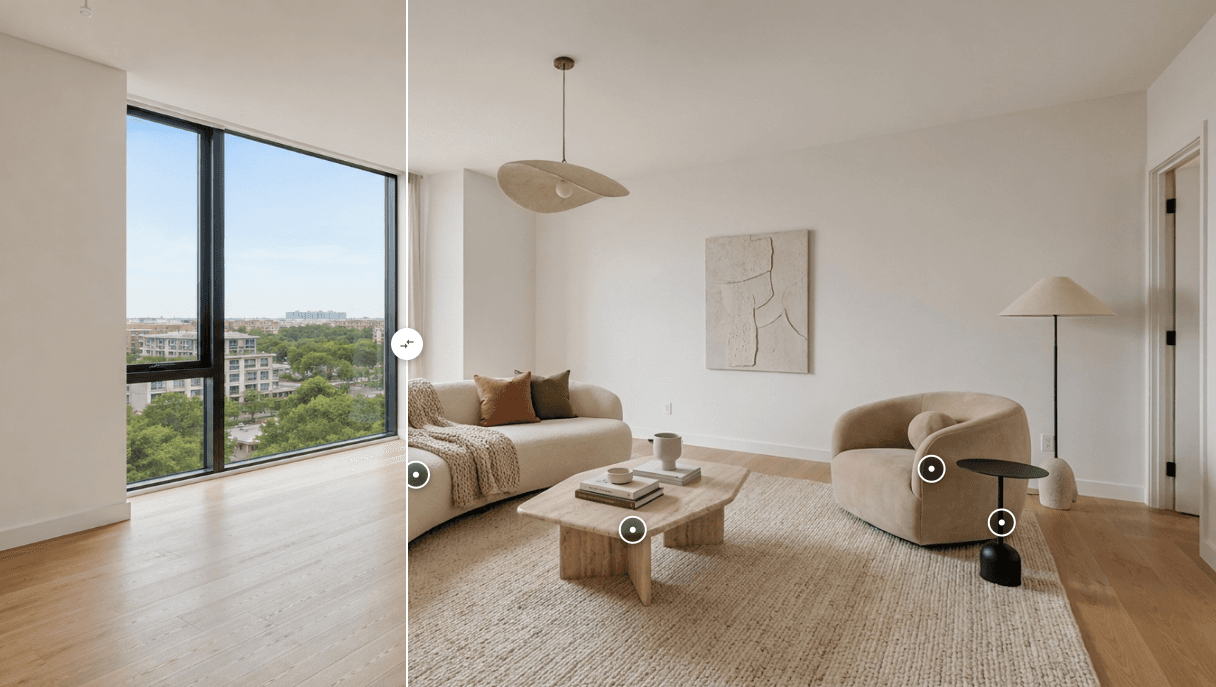

AI virtual staging works by analyzing a room photo, identifying its layout and architectural features, and generating furniture and décor that fit the visible space. Instead of physically renting and arranging furniture, users can upload a property image, choose a design style, generate a staged version, and review the result before using it in marketing.
For real estate agents, property marketers, photographers, homeowners, and designers, AI virtual staging provides a faster way to visualize how an empty or outdated room could look when furnished. However, every generated image should be reviewed carefully and clearly disclosed when used in property marketing.

.PNG)
What Is AI Virtual Staging?
AI virtual staging is the process of using artificial intelligence to add digital furniture, lighting, artwork, rugs, plants, and other decorative elements to a photograph of a real room.
Traditional virtual staging usually requires a designer to place and adjust individual 3D objects manually. AI virtual staging software can automate much of this process by analyzing the room and generating a furnished image based on a selected interior style.
The result is not a photograph of the property’s actual furnishings. It is a visual representation that helps prospective buyers, renters, or homeowners imagine what the space could look like.
According to the National Association of REALTORS®, 83% of buyers’ agents said staging made it easier for buyers to visualize a property as their future home. This statistic refers to home staging generally, but it helps explain why visual presentation matters in real estate marketing.
How Does AI Virtual Staging Work?
Although the exact technology varies between platforms, most AI home staging workflows follow six basic steps.
Upload a Room Photo
The process begins with a photograph of the room you want to stage.
For a more reliable result, use an image that is:
- Clear and well lit
- Taken from a natural viewing angle
- High enough in resolution for its intended use
- Free from heavy blur or distortion
- Unobstructed by people, boxes, or large temporary objects
Empty rooms are often the easiest to stage, but some virtual staging software can also work with outdated or partially furnished spaces.
A poor-quality source image can lead to distorted furniture, inconsistent lighting, or unrealistic scale. AI can improve the presentation of a room, but it cannot fully recover details that are missing from the original photo.
Analyze the Room
The AI examines the image to identify visible elements such as:
- Walls and floors
- Windows and doors
- Ceiling lines
- Existing furniture
- Room boundaries
- Perspective and depth
- Likely room type
This visual analysis helps the system decide where furniture can be placed and how large it should appear.
However, a single photograph does not provide complete physical measurements. The generated layout should therefore be treated as a visual concept—not a precise floor plan or a guarantee that every item would fit the real space.
Choose a Room Type and Design Style
The user may then select a room category and an interior design direction.
Common room categories include:
- Living room
- Bedroom
- Dining room
- Home office
- Kitchen
- Children’s room
Common design styles may include:
- Modern
- Scandinavian
- Minimalist
- Contemporary
- Industrial
- Coastal
- Farmhouse
- Luxury
Choosing the correct room type helps the system generate appropriate furniture. For example, selecting “home office” for a bedroom photo could produce a polished result that does not match the property’s intended use.
Generate the Staged Image
The AI generates a furnished version of the room based on the source photo and the selected style.
Depending on the software, the output may include:
- Sofas, beds, tables, desks, and chairs
- Rugs and curtains
- Lamps and lighting effects
- Wall art and decorative objects
- Plants and accessories
- Coordinated colors and materials
Generation is not the final step. Even a realistic image can contain subtle errors, so every output should be reviewed before publication.
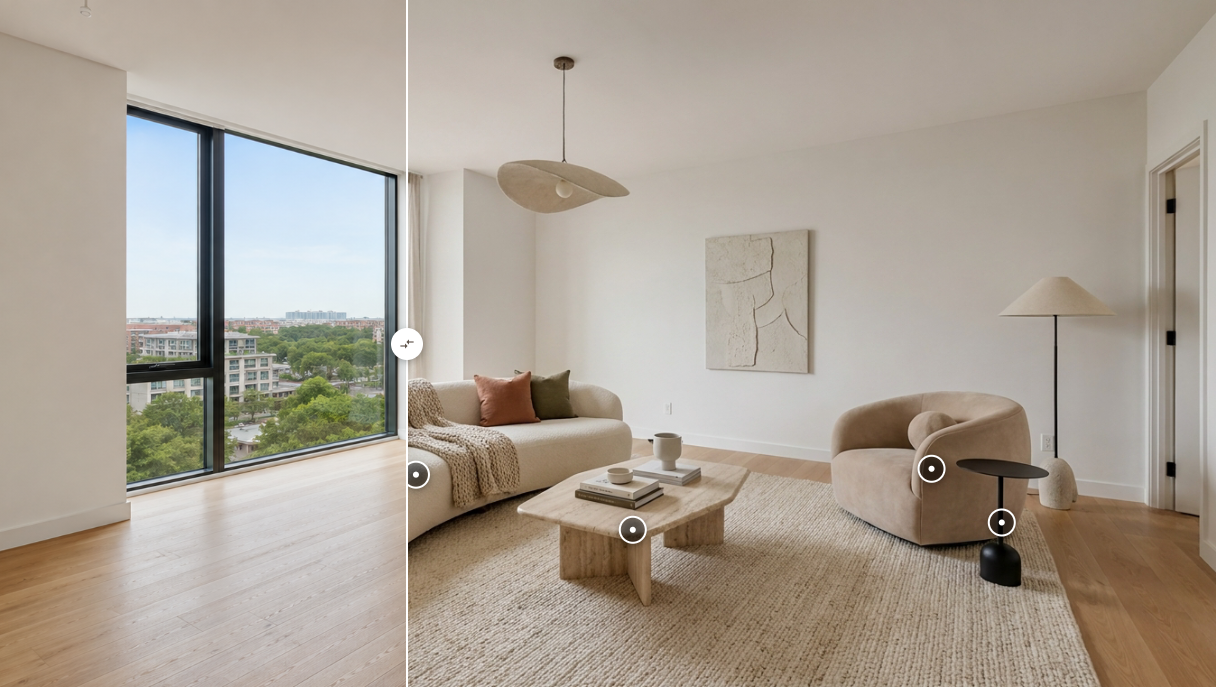
Review the Result
Before using a virtually staged photo, compare it carefully with the original image.
Check whether:
- Doors and windows remain in the correct positions
- Permanent walls and architectural features are unchanged
- Furniture scale looks realistic
- Objects do not block entrances or walkways
- Lighting and shadows match the room
- Mirrors and reflective surfaces look natural
- Furniture does not overlap walls or other objects
- Small details remain consistent when the image is enlarged
Pay particular attention to fireplaces, built-in cabinets, staircases, windows, ceiling fixtures, and exterior views. These are part of the property and should not be unintentionally changed.
If an image materially misrepresents the property, it should not be used merely because it looks attractive.
Edit, Regenerate, or Export
If the first result is not suitable, the user can try a different style, room type, source image, or generation.
Once the image has been reviewed and approved, it can be exported for an appropriate use, such as:
- Property listing presentations
- Real estate marketing materials
- Social media posts
- Property brochures
- Interior design concepts
- Home renovation inspiration
The original photo should always be retained. For real estate use, presenting the original and virtually staged versions together is often the clearest approach.
What Can AI Virtual Staging Change?
AI virtual staging is generally suitable for visual additions such as furniture and décor.
It may be used to show:
- How an empty living room could be arranged
- How a bedroom could accommodate furniture
- How different interior styles affect the same room
- How a dated room could feel with updated décor
- How a vacant property could look when occupied
However, users should be cautious about changing permanent property features.
These may include:
- Room dimensions
- Windows and doors
- Structural walls
- Ceiling height
- Flooring condition
- Built-in storage
- Views from the property
- Signs of damage or deterioration
If a tool changes one of these features accidentally, regenerate the image or use a different result.
AI Virtual Staging vs. Traditional Home Staging
AI virtual staging and traditional staging serve similar visual goals, but their workflows are different.
With AI virtual staging, furniture is digitally generated and appears only in the marketing image. The process usually requires a room photo rather than physical access to the property, and users can explore multiple design directions without delivering, installing, storing, or removing furniture.
Traditional staging uses physical furniture that buyers can see during an in-person visit. It requires more logistical coordination but provides a real furnished environment inside the property.
AI virtual staging is especially useful when the immediate goal is to improve the visual presentation of listing photographs. Traditional staging may be more appropriate when visitors need to experience a furnished space during an in-person viewing.
The two approaches are not necessarily competitors. A property marketer may use virtual staging for early listing promotion and physical staging for selected properties or later stages of the sales process.
Who Can Use AI Virtual Staging?
Real Estate Agents
Agents can use virtual staging for real estate listings involving vacant, outdated, or sparsely furnished rooms. It can help demonstrate possible room functions and make listing photography easier to understand.
Real Estate Photographers
Photographers can offer virtually staged photos as an additional visual service, provided that editing standards, image rights, and disclosure responsibilities are clearly agreed upon.
Property Owners and Sellers
Owners can explore how a room might look before deciding whether to purchase furniture, repaint, renovate, or physically stage the property.
Interior Designers
Designers can use AI-generated images for early inspiration and style exploration. These images should not be treated as construction drawings, measured layouts, or final specifications.
Renters and Homeowners
People can also use AI tools to explore furniture arrangements and design styles before making changes to their homes.
How to Virtually Stage a Room Responsibly
Virtually staged photos should help viewers understand the potential of a space without misleading them about its actual condition.
The National Association of REALTORS® notes that photo enhancements that materially alter a property should be disclosed so buyers receive a truthful picture of the home. Specific requirements may vary by MLS, advertising platform, brokerage, and location.
A practical disclosure process includes:
- Keep the original, unedited property photo.
- Label the edited image as “Virtually Staged.”
- Avoid removing damage or changing permanent features.
- Show the original photo alongside the edited version where possible.
- Confirm the applicable rules with the relevant MLS, brokerage, platform, or legal adviser.
This article provides general information and is not legal advice or an interpretation of any specific MLS rule.
How to Evaluate AI Virtual Staging Software
When comparing virtual staging software, do not judge it only by how quickly it generates an image. Review the quality and reliability of the complete workflow.
Room Preservation
Does the software keep walls, windows, doors, flooring, and built-in features consistent with the original photo?
Furniture Scale
Do the generated sofas, beds, tables, and chairs look proportionate to the room?
Style Consistency
Can it produce a coherent room instead of a collection of unrelated objects?
Output Quality
Is the exported image clear enough for its intended use without visible artifacts?
Revision Options
Can users regenerate the room or explore another design style when the first result is unsuitable?
Disclosure Workflow
Can the original and staged versions be kept together? Can the final image be labelled clearly?
Intended User
Some tools are designed mainly for casual home inspiration. Others are more relevant to real estate marketing, photographers, or repeat professional use. Choose software based on the workflow you actually need.
Where Astage AI Fits
Astage AI is relevant to people who want to explore AI-assisted virtual staging and interior visualization from room photos.
You can view examples in the Astage AI portfolio or explore the interactive before-and-after experience to see how an original room can be compared with a generated design.
Astage AI may be suitable if you want to:
- Visualize an empty room with furniture and décor
- Explore different interior directions from a photo
- Create visual concepts for a property or home
- Compare an original image with an AI-generated transformation
It is not a substitute for professional property inspection, architectural drawings, verified measurements, legal disclosure advice, or final construction documentation.
Frequently Asked Questions
Is AI virtual staging the same as interior design?
No. AI virtual staging primarily creates visual representations of furnished rooms. Professional interior design may also involve measurements, budgets, materials, building requirements, procurement, installation, and coordination with contractors.
Can AI virtually stage an empty room?
Yes. Empty rooms are a common use case because the system has fewer existing objects to interpret. The quality of the result still depends on the source image, perspective, lighting, and software.
Can AI virtual staging remove existing furniture?
Some tools may be able to generate a redesigned or visually cleared version of a furnished room. Results should be checked carefully because removing objects can cause the system to reconstruct hidden floors, walls, or other details inaccurately.
Should virtually staged photos be disclosed?
Disclosure requirements vary, but clearly labelling virtually staged images is a responsible practice. Material changes to a property image may be subject to MLS, brokerage, platform, advertising, or local requirements.
Does virtual staging guarantee that a property will sell faster?
No. Staging may help viewers understand a space, but property performance also depends on pricing, location, condition, demand, distribution, photography, and many other factors.
AI virtual staging should be treated as a marketing and visualization tool, not a guarantee of a particular sales result.
Final Thoughts
AI virtual staging turns a room photograph into a furnished visual concept by analyzing the space, generating appropriate furniture and décor, and allowing the user to review the result.
The most important step is not simply generating the image—it is checking that the result remains faithful to the real property. Architectural features should be preserved, generated furniture should look realistic, and virtually staged photos should be disclosed appropriately.
If you want to see this process in action, explore Astage AI and review its before-and-after transformations.